OI graphs and back testing
Back Tester: Replay the Historical Option Chain
The Back Tester is the AOC page that loads the full option chain for any past expiry, date and time, and replays it forward from there, step by step or on autoplay. You see OI, OI change, highlights, support and resistance and the split chart exactly as they stood, so you can check a setup against what the market did next.
On this page
Where do I find the Back Tester?
Menu, then Option Chain, then Back Tester. It is also on the home screen and as a tab in Tabbed AOC. Stock screener popups in history mode and the sectorial replay link straight into the Back Tester at the right symbol and moment.
For what option chain back testing is and why traders do it, read option chain backtest. This page is about using the tool.
Is the Back Tester free?
You need to be logged in. After that, past sessions are free. On weekdays from about 08:30 to 16:30 IST, any moment from the last 8 hours is AOC Pro only, so you cannot replay today's live session for free while the market is open. CRUDEOIL and NATURALGAS need AOC Pro at any time. Locked moments show the upgrade screen; see pricing.
How do I back test a past session?
The Expiry, Date and Time chips stay in the toolbar (in the top bar on desktop and on phones held sideways), so you can change any of them at any point. The link in your address bar holds the moment, which makes it easy to save or share.
- Pick a symbol from the search in the top bar. Use AI for the AI chain. Changing the symbol clears the expiry and date.
- Choose an expiry from the buttons, or tap More for a calendar.
- Choose a date. Only trading days with data for that expiry are offered. The time starts at 09:15:00.
- Use the Time chip to jump to a specific time, typed in or picked on the dial.
- Read the chain, then move through time with the replay bar at the bottom.
How does the replay bar work?
- Back and forward buttons move by the current step, shown next to them (for example 1m).
- Play and pause steps forward on its own. Autoplay stops at the day's last snapshot.
- The clock shows the current time, and the slider covers the session from its first to its last snapshot. Drag it to jump; the time shows above your finger.
- Replay speed: every 1s, 2s (default), 5s or 10s.
- Jump size: 5s, 10s, 30s, 1m (default), 3m, 5m, 30m, 1h, 2h or 1 day.
- On phones narrower than 640 px, speed and jump sit behind the slider icon.
- Keyboard: Space plays or pauses, the left and right arrow keys step back and forward.
- Drag the grip on the left to move the bar off the rows you are reading, and drag its right edge to resize it. AOC remembers both on this device.
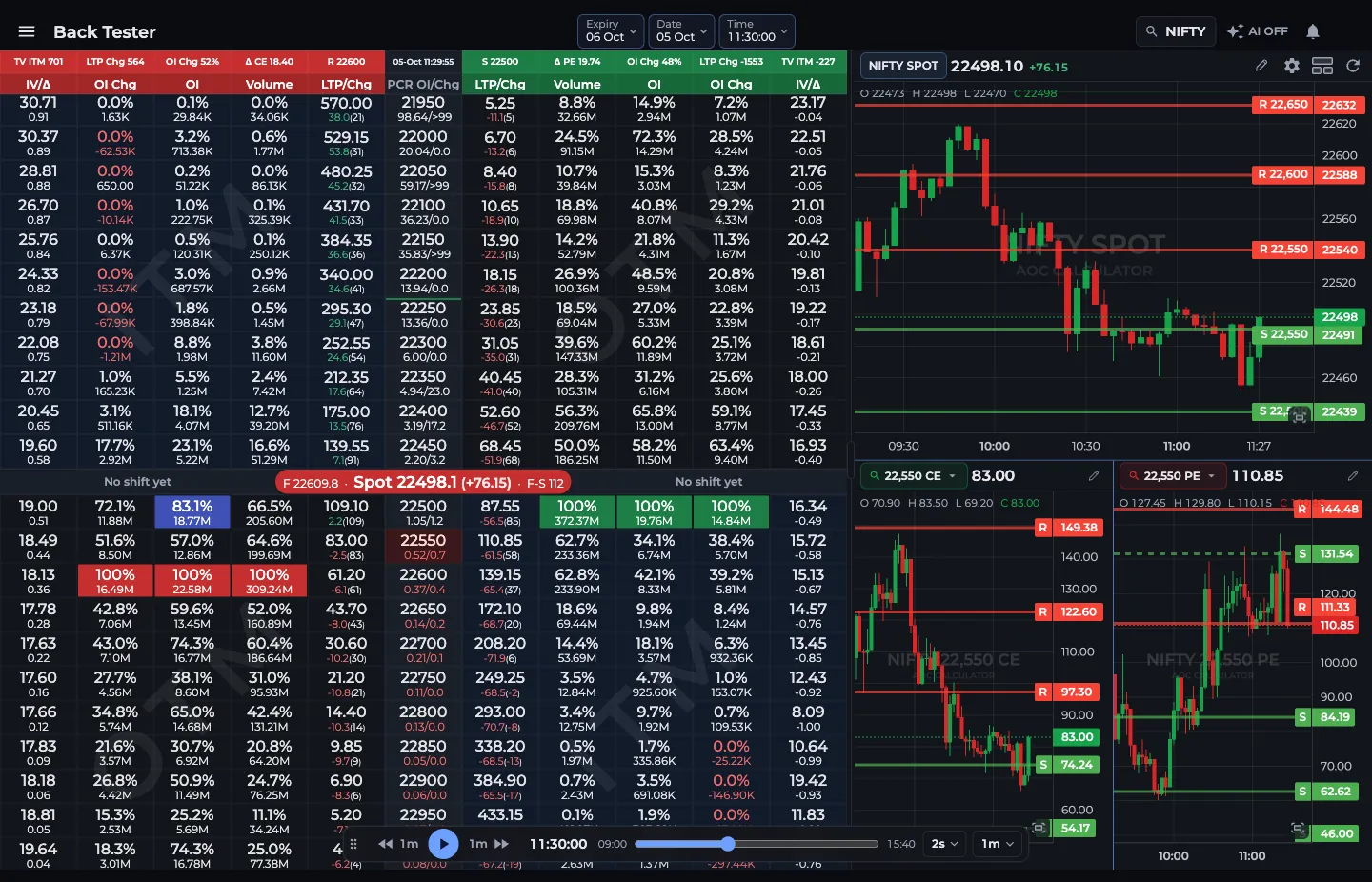
- 1Expiry, Date and Time chips
- 2Back, play or pause, forward
- 3Drag the slider to jump in time
- 4Replay speed and jump size
What does the 1 day step do?
With Jump set to 1 day, forward moves to the next trading date that has data for the same expiry and keeps the clock where it was. Back moves to the previous one. At 11:00, a 1 day step forward lands on 11:00 of the next session.
That makes day-to-day comparison quick: how did the 24,500 PE OI at 11:00 today compare with 11:00 yesterday? Autoplay on 1 day stops at the last date available for that expiry.
What do I see on the chain?
The same chain as the live option chain: your columns, the red, green and yellow highlights, PCR, the split chart button and your settings. The difference is that trading buttons are switched off, since you are looking at the past.
Worked example: did the support hold?
You suspect put writers at 24,500 held NIFTY on a recent expiry day. Load that expiry, pick the date and set the time to 10:00. The 24,500 PE shows the highest put OI and a green highlight, with spot at 24,560.
Set Jump to 5m and press play. At 11:20 spot dips to 24,515 but 24,500 PE OI keeps rising, from 62 lakh to 71 lakh. By 12:30 spot is back at 24,600. Writers defended the level.
Now try a session where it broke: you will often see put OI at the strike stop rising and start falling before spot cuts through. Spotting that difference in replay is what makes the next live session easier to read. AOC is an analysis tool, and past behaviour does not promise the same next time.
Frequently asked questions
Can I back test today's option chain in AOC?
With AOC Pro, yes, at any time. On a free account, moments from the last 8 hours are locked on weekdays from about 08:30 to 16:30 IST, so today's session opens up for free accounts once that window ends.
What step sizes does the Back Tester support?
Jump size can be 5s, 10s, 30s, 1m, 3m, 5m, 30m, 1h, 2h or 1 day, with 1m as the default. Replay speed, the gap between steps on autoplay, can be 1s, 2s, 5s or 10s.
Does the 1 day step change the time?
No. A 1 day step moves to the previous or next trading date with data for the same expiry and keeps the same time, so you compare like with like.
Are there keyboard shortcuts in the Back Tester?
Yes. Space plays or pauses the replay, and the left and right arrow keys step back and forward by the current jump size. They do not fire while you are typing in a field or have a dialog open.
Last updated