OI graphs and back testing
OI Graphs Replay: Historical OI by Strike
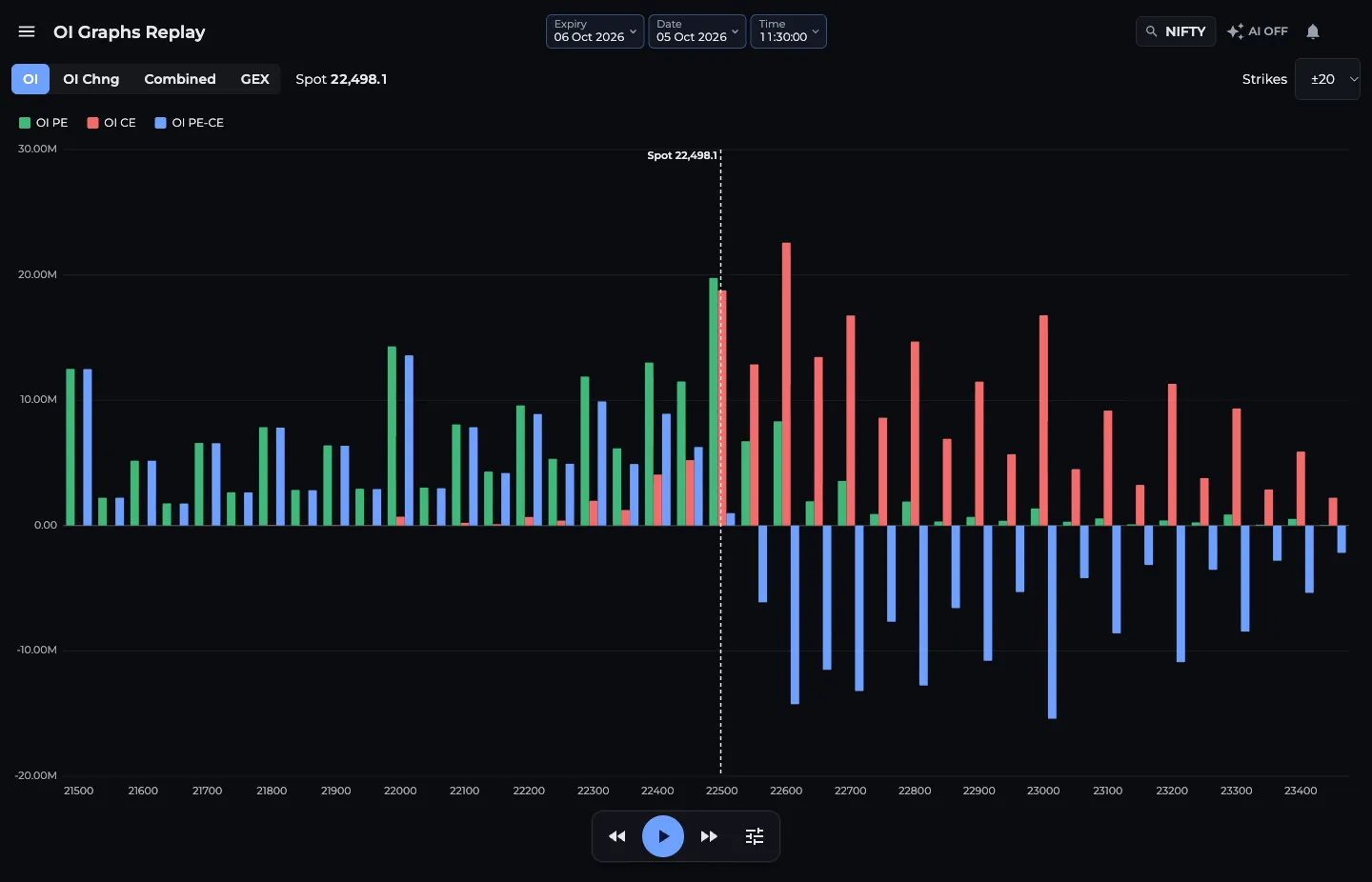
OI Graphs Replay is the AOC page that shows the strike-wise OI, OI change, Combined and GEX bars as they stood at any moment of a past trading session, and plays them forward like a video. It is how you go back to last Thursday's expiry and see exactly when the put writers gave up, and a good way to practise reading OI without risking money.
On this page
Where do I find OI Graphs Replay?
Menu, then Charts & Graphs, then OI Graphs Replay. In Tabbed AOC it is a tab of the same name that stays on the same symbol, expiry, date and time as a Back Tester tab, so you can flip between bars and the full chain at the same moment.
You need to be logged in. Free accounts can replay past sessions. On weekdays from about 08:30 to 16:30 IST, any moment from the last 8 hours needs AOC Pro, and CRUDEOIL and NATURALGAS always need AOC Pro. When a moment is locked you see the message to upgrade; see pricing.
How do I replay a past session?
The symbol, expiry, date and time live in the page link, so you can bookmark a moment or send it to a friend.
- Pick a symbol from the search in the top bar. Turn on AI if you want the AI chain.
- Choose an expiry. A few expiries appear as buttons; More opens a calendar with the rest. The Expiry chip in the toolbar does the same.
- Choose a date. Only trading days with data for that expiry are offered. The time starts at 09:15:00.
- Set a different start time with the Time chip if you want.
- Pick a chart tab and use the replay buttons under the chart: step back, play or pause, step forward.
- Open Replay settings (the slider icon) to set Speed (1, 2, 5 or 10 sec between steps, default 2 sec) and Jump (5 sec, 10 sec, 30 sec, 1 min, 3 min or 5 min per step, default 1 min).
- 1Expiry, Date and Time chips
- 2Chart tabs: OI, OI Chng, Combined, GEX
- 3Strikes window around spot
- 4Step back, play or pause, step forward
- 5Replay settings: Speed and Jump
What do the bars and colours mean?
Tap legend names to hide puts, calls or the difference. Strikes sets the window around spot: ±10, ±20 (default), ±40 or All.
- OI: OI PE (green), OI CE (red), OI PE-CE (blue) for each strike at that moment.
- OI Chng: the same three series for change in OI since the previous close.
- Combined: per side, a solid bar for OI carried in, a hatched part for OI added that day and a hollow outline for OI removed. Same reading as on All OI Bar Graphs.
- GEX: net gamma exposure per strike. Positive values are red bars above zero, negative values green bars below zero.
- A dashed vertical line marks the spot price, labelled with its value.
Worked example: watching support shift
Load NIFTY for a recent expiry day at 09:20 on the OI Chng tab, with Jump at 5 min. At 09:20 the biggest green bar is 24,300 PE at about 12 lakh, and spot is 24,350.
Press play. By 10:30 the 24,400 PE bar has grown past 24,300 and spot has moved to 24,450. By 11:45 24,500 PE is the tallest green bar and 24,500 CE has gone negative, meaning call writers there covered. Support walked up 200 points in two and a half hours, and the replay lets you see each step of it.
Pause at the moment you think the trend was clear, then check the same moment in the Back Tester to see PCR and the full chain.
What does the replay not do?
It shows strike-wise bars only, not volume bars or the option chain table. There are no keyboard shortcuts on this page. For a time-scrubber, larger jumps up to a full day, and the full chain with its split chart, use the Back Tester.
Frequently asked questions
Is OI Graphs Replay free?
Past sessions are free with a login. During weekday market hours (about 08:30 to 16:30 IST) the last 8 hours need AOC Pro, and CRUDEOIL and NATURALGAS always need AOC Pro.
How far does each step move in OI Graphs Replay?
As far as the Jump setting in Replay settings: 5 sec, 10 sec, 30 sec, 1 min, 3 min or 5 min. The default is 1 min. Speed sets how many seconds pass between steps during autoplay.
Can I share a replay moment?
Yes. The symbol, expiry, date and time are part of the page address, so copying the link opens the same moment for anyone who is logged in.
Last updated