Option chain
Tabbed AOC: Keep Several AOC Screens Open in Tabs
Tabbed AOC is a workspace that keeps several AOC screens open at once as tabs, so you can jump from the live option chain to Multi Charts or Power Stocks and back without reloading anything. It suits intraday traders who watch the chain, a chart and a screener through the day on one browser tab.
On this page
Where is Tabbed AOC and what does it look like?
Pick Tabbed AOC in the Option Chain group of the side menu, or open /tabbed-aoc. The tab strip sits along the bottom on a phone held upright, and down the right edge on wider screens and on a phone held sideways.
The first tab is always the NIFTY option chain and cannot be removed. Each tab shows an icon and its position number. Inside a tab there is no side menu or footer: the strip is the frame.
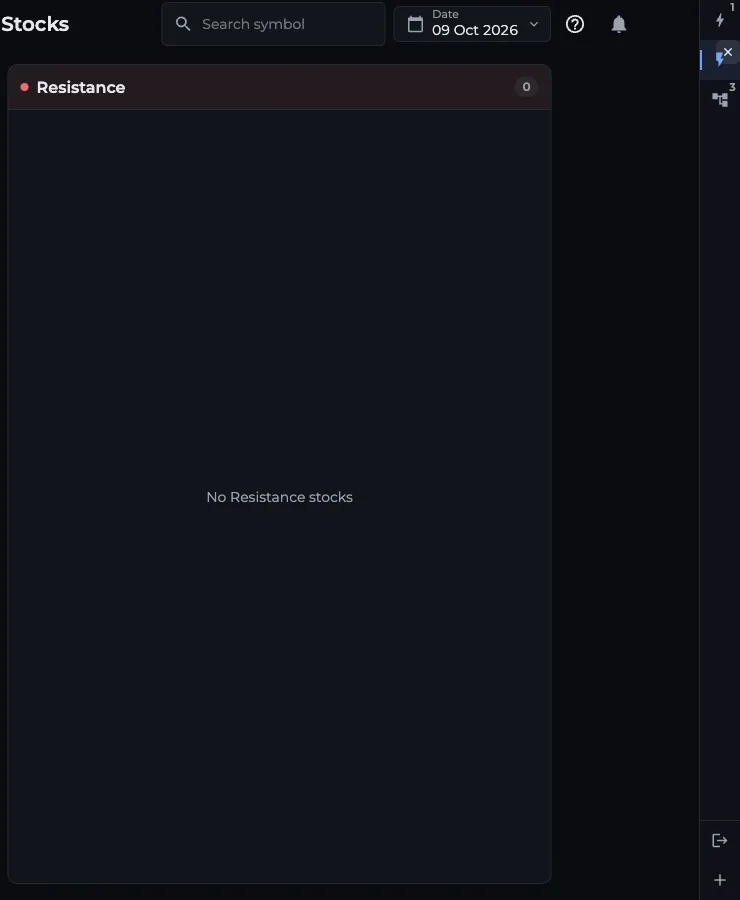
- 1First tab: NIFTY option chain
- 2Selected tab with its x to remove
- 3Exit tabbed mode
- 4+ Add page adds a tab
How do I add a page as a tab?
- Tap the + button (Add page) at the end of the strip.
- Scroll the grouped list or type in Search pages, for example "power" or "replay".
- Tap a page. It opens as a new tab and becomes the active one. Enter adds the first match.
- Repeat for the other screens you want. A page that is already open does not show in the list: Tabbed AOC keeps one tab per page.
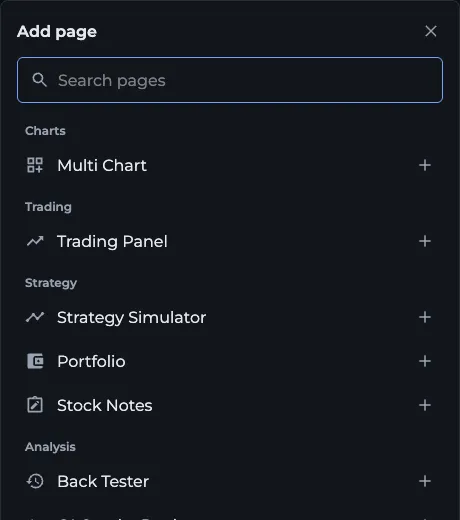
- 1Search pages by name
- 2Tap a page to open it as a tab
Which pages can I open in a tab?
Option Chain, Multi Chart, Trading Panel, Strategy Builder, Strategy Simulator, Portfolio, Stock Notes, Back Tester, OI Graphs Replay, Market Overview, Global Markets, FII / DII Data, Power Stocks, AI Stocks, S/R Stocks, Oi2Oi Stocks, Triple S/R Stocks, Multi OI Graphs, Multi Percentage Graphs, All OI Bar Graphs, All Volume Bar Graphs, Sectorial Data, Sectorial Replay, Profile and Plans.
Each page keeps its own access rules. A Pro screen on a free account shows the same plans prompt it would show outside Tabbed AOC.
Do tabs keep running in the background?
Yes. A tab loads the first time you open it and then stays alive while hidden: the live chain keeps receiving data, the chart keeps its zoom and a half-filled strategy keeps its legs. Switching back is instant.
Symbols travel between tabs. Change the option chain to BANKNIFTY and the Strategy Builder tab follows, and the other way round. The Back Tester, OI Graphs Replay and Strategy Simulator share the replayed moment (symbol, expiry, date and time), so stepping the Back Tester to 11:30 lines up the replay tab too.
How do I switch, reorder and remove tabs?
- Switch: tap a tab, or press Alt + 1 to 9 on a keyboard (Ctrl or Cmd + digit also works where the browser allows it)
- Reorder: drag a tab to a new place in the strip with the mouse
- Remove: tap the small x on the selected tab, or right-click or long-press any tab except the first, then confirm Remove
- Open a link inside a tab: if that page is already in another tab, AOC jumps there; otherwise it asks Open here, Add new tab or Exit Tabbed AOC and open
How do I leave Tabbed AOC?
Tap the exit icon in the strip (Exit tabbed mode) and confirm Exit. The active tab's page opens on its own with the normal menu.
Your tabs and the selected one are remembered in this browser, so the next visit to Tabbed AOC opens the same set. The address bar also tracks the active tab, for example /tabbed-aoc?tab=/power-stocks, and opening such a link selects or adds that tab.
Frequently asked questions
Does Tabbed AOC need AOC Pro?
Tabbed AOC itself is open to everyone, but each page inside it has its usual access. The live option chain, screeners and other Pro screens still need AOC Pro, while pages like the Back Tester work with a free login.
Will my tabs be there tomorrow?
Yes, on the same browser. Tabbed AOC saves the list of open tabs and the active one, and restores them next time. A different browser or device starts with just the option chain tab.
Can I open two option chains in Tabbed AOC?
No. Tabbed AOC keeps one tab per page, so there is a single option chain tab. To watch several symbols side by side, use Multi Charts or the Multi OI Graphs page in another tab.
Is there a keyboard shortcut to switch tabs?
Yes. Alt plus a number from 1 to 9 selects that tab. Ctrl or Cmd plus the number also works where the browser does not keep that shortcut for its own tabs.
Last updated