Market data
Sectorial Replay: Sector Performance at Any Past Time
Sectorial Replay in AOC shows the sector board as it looked at any past date and time, down to the minute. Handy after a gap-down morning or an expiry day, when you want to know which sector was leading at the exact minute NIFTY turned.
On this page
What is Sectorial Replay for?
It is the same board as Sectorial Data (Advanced / Declined / Total counters, sector cards with breadth, expandable constituents), frozen at the moment you pick.
Live data tells you what is happening. Replay lets you go back to 10:05 IST on a trend day and see whether BANK and FIN SERVICE were already leading before the move showed up on NIFTY.
How do I replay a past session?
- Open the side menu, go to Sector Analysis and pick Sectorial Replay (or use the replay button on the Sectorial Data page).
- Tap Date and pick a trading day. Only days with saved sector data are listed.
- Tap the time button and set the hour and minute in IST, for example 09:20.
- Read the Replay time line to confirm the moment you are looking at, then scan the sector cards.
- Expand a sector to see its constituents at that time, and change the time a few minutes at a time to watch the rotation.
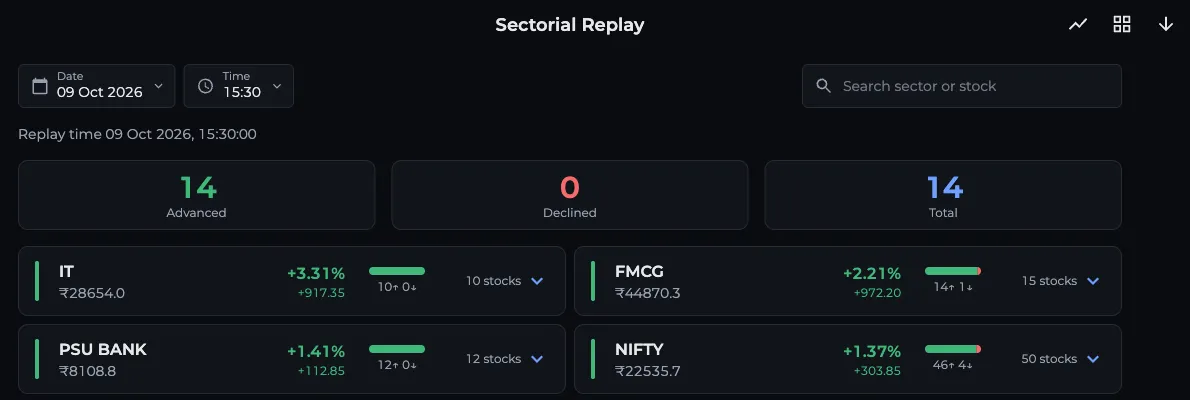
- 1Date: pick a trading day
- 2Time in IST
- 3Replay time confirms the moment
- 4Expand a sector for its stocks
What time does it open on?
With no date or time chosen, the page opens on the latest available day. For today it uses the current IST time, kept between 09:15 and 15:30. For a past day it opens at 15:30, the close.
If there is no snapshot for the minute you picked, you will see "No sectorial data for this time". Pick a time inside market hours.
Can I share a replay moment?
Yes. The date and time sit in the page address (for example ?date=2026-10-09&time=10:05), so copying the URL gives the other person the same moment. Handy when you are discussing a setup in the traders community.
What changes compared with live Sectorial Data?
- Constituents load as they were at the replay time, with the same Symbol, Price, Chg, %Chg, Wt% and WChg columns.
- Tapping a stock opens its historical option chain at that same date and time, not the live chain. See the back tester for how to read it.
- The chart button opens a Replay Chart: sector percentage change from the morning up to your chosen time, with the same interval menu (1 min to 1 hour) and up to 8 sectors.
- There is no auto refresh, since the data is fixed.
Do I need to log in?
Yes, Sectorial Replay needs a login. If you also want the live board, see the plan note on the Sectorial Data guide.
Frequently asked questions
How do I see sector performance on a past date?
Open Sectorial Replay, pick the date and an IST time, and the board shows every sector index, its breadth and its constituents as they were at that minute. Only dates with saved sector data appear in the date list.
Why does Sectorial Replay say no data for this time?
There is no saved snapshot for that minute, usually because it is outside market hours (09:15 to 15:30 IST) or the day is a holiday. Pick a time within the session.
Can I open the option chain of a stock from Sectorial Replay?
Yes. Tap an F&O stock in a sector's constituents and it opens the historical option chain at the same date and time you are replaying.
Can I share a Sectorial Replay link?
Yes. The chosen date and time are part of the page URL, so anyone who opens the link lands on the same replay moment.
Last updated