Charts and strategies
Strategy Simulator: Back Test Option Strategies
Strategy Simulator is AOC's tool for testing an option strategy on past market data: you pick an old expiry, date and time, take positions on that day's option chain, then step or play the clock forward and watch the P&L change. Good for practising adjustments, and for finding out how a setup really behaved on an expiry day before you put money on it.
On this page
What do I need to use the Strategy Simulator?
Login and Strategy Builder access, the same add-on that opens the Strategy Builder and Strategy Portfolio. Without it the page shows the plans that include it. See pricing.
Results are a replay of recorded snapshots. Payoff, POP and margin are estimates, and AOC is an analysis tool, not investment advice.
How do I replay a strategy on a past day?
Changing the expiry clears the date, since each expiry has its own list of trading days.
- Pick the symbol with the search in the app bar (NIFTY by default).
- Choose an expiry, then a date that has data for it, then a time (it starts at 09:15:00). The snapshot loads as soon as all three are set. There is no fetch button.
- In the option chain, hover over a strike's volume or LTP cells (tap on a phone) and press B or S to add legs at that moment's premium.
- Use the replay bar over the chain to move forward. Positions, P&L and the payoff update at each step.
- Exit legs along the way if you want to test an adjustment. The exit is booked at the snapshot's time.
- Press Save to keep the simulation in your portfolio.
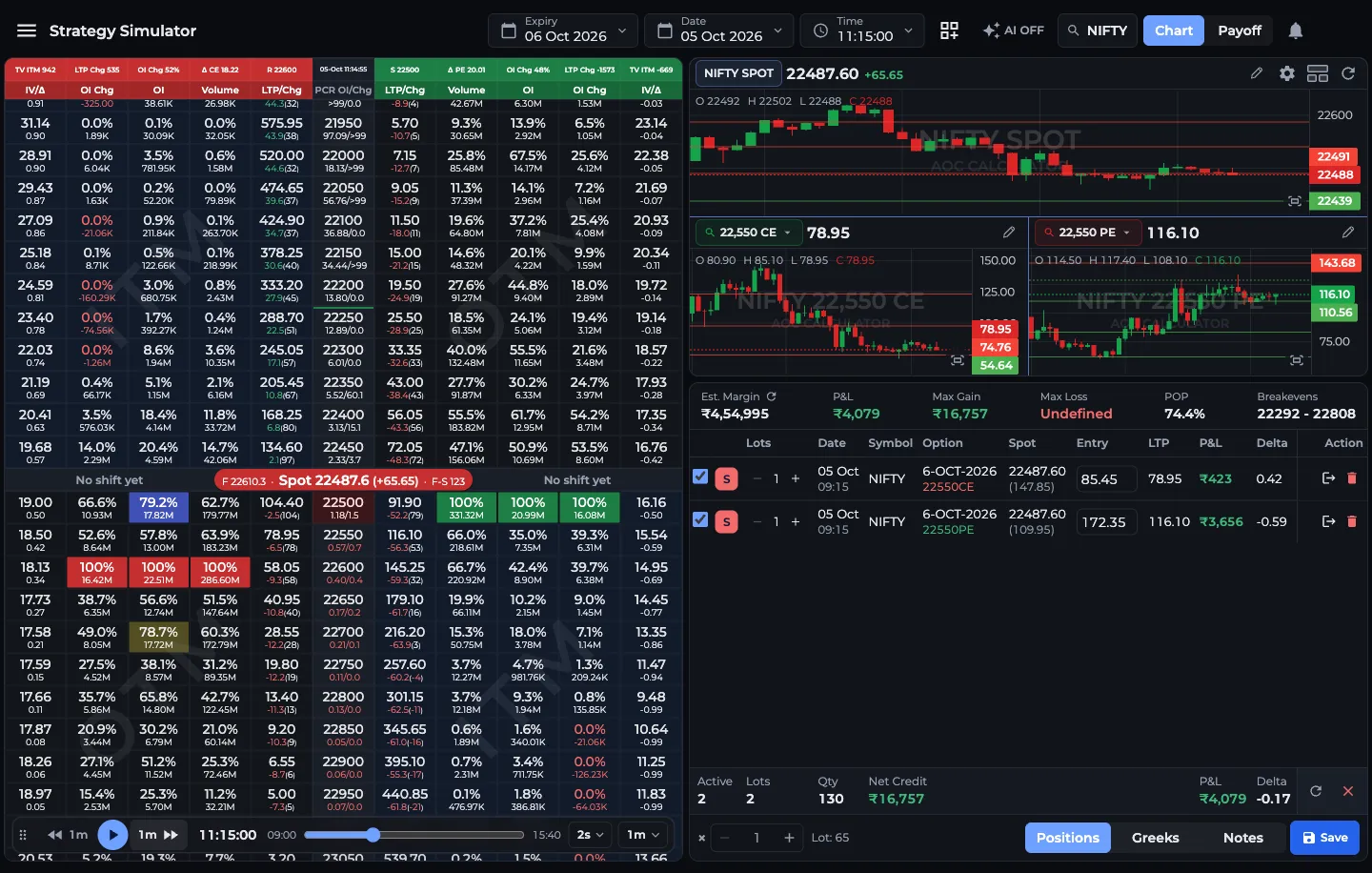
- 1Expiry, Date and Time pickers
- 2Replay bar: back, play, forward
- 3Slider jumps to any time
- 4Legs and P&L update at each step
- 5Save keeps it in your portfolio
What do the replay controls do?
Drag the handle on the left of the bar to move it off the strikes you need, and drag its right edge to change its length. Both are remembered on this device.
- Back and forward buttons move the clock by the step size shown on them, 1m by default.
- Play steps forward on its own and stops at the day's last snapshot. Pause stops it.
- The slider jumps to any time in the session.
- Speed: Every 1s, Every 2s (default), Every 5s or Every 10s between steps.
- Step size: from Step 5s up to Step 2h, or Step 1 day, which moves to the next or previous trading date with data at the same time.
How is the simulator different from the builder?
The workspace looks the same: metrics strip, positions table, Positions / Greeks / Notes tabs, the × multiplier, Customize layout, the AI toggle and the Chart / Payoff switch. The differences matter though:
- Time is the snapshot's time, not the clock on your wall. Days to expiry, the T+0 line and POP are all worked out from the moment you are viewing.
- There are no prebuilt templates. You add every leg from the chain.
- Est. Margin uses AOC's own SPAN-style estimate only, since an online calculator only knows today's contracts.
- There is no Execute button. Nothing here can place an order.
- With AI on, the simulator replays the symbol's AI option chain, as the Back Tester does.
Can I open a saved strategy in the simulator?
Yes. In the Strategy Portfolio, press Simulator on any saved strategy. The simulator loads its legs and jumps to the first leg's entry date and time when that can be read from the entry label, so you can replay from where the trade started.
Simulations save with the simulator type. The portfolio opens them back in the simulator, and in the traders community they are tagged as back-tests.
What is a good way to use it?
Pick an expiry day where NIFTY made a big move, say a 300-point fall after 11:00 IST. Sell a short straddle at 09:20, set the step to 5m and press play. You will see how fast the PE side hurts, whether the T+0 line lagged the expiry line, and at what time an adjustment would have saved the trade.
Then replay the same day with a short iron condor and compare. One day proves very little, so test the same setup on several expiries before trusting it.
Frequently asked questions
Can I back test option strategies on AOC?
Yes. The Strategy Simulator replays recorded option chain snapshots for a chosen expiry, date and time. You add legs at that moment's premiums and step or play the clock forward to see the P&L.
Does the Strategy Simulator place real trades?
No. The simulator has no Execute button and never sends orders. Only the live Strategy Builder can place orders, through a linked AliceBlue account.
Why is there no data for the date I picked?
Dates are listed per expiry, so pick the expiry first and then a date from its list. If a snapshot still fails to load, try another time in the session.
Can I save a simulated strategy?
Yes. Save stores it in your Strategy Portfolio as a simulation, and Simulator on that row opens it again at the entry date and time.
Last updated