Charts and strategies
Strategy Builder: Build Option Strategies With Payoff
Strategy Builder is AOC's screen for building multi-leg option strategies on the live option chain and seeing the payoff, P&L, Greeks, probability of profit and estimated margin before you trade. F&O traders use it to compare a short straddle with an iron condor in a few clicks, track open positions live, and save or execute them.
On this page
Who can use Strategy Builder?
You need to be logged in and have Strategy Builder access. It is sold as an add-on to an active AOC plan, or as part of plans that include it, and the same access opens the Strategy Simulator and Strategy Portfolio. Without it the page offers the matching plans. See pricing.
Payoff, POP and margin in the builder are estimates from models and live quotes. AOC is an analysis tool, not investment advice.
How do I start from a prebuilt strategy?
The builder opens on a grid of templates with their payoff shape. Pick an outlook: Neutral (14 templates, from Short Straddle and Short Iron Condor to Batman and Jade Lizard), Bearish (8, such as Bear Put Spread and Put Ratio Back Spread) or Bullish (8, such as Bull Call Spread and Long Call). Use the symbol search in the app bar first if you want something other than NIFTY.
Click a card and AOC builds the legs on the current chain at live premiums. Strikes are counted from ATM in listed strikes, so a Short Strangle sells 5 strikes either side whether the step is 50 (NIFTY) or 100 (BANKNIFTY). If the chain does not reach a strike or a leg has no premium, you get a message instead of a half-built strategy. Calendar spreads are not in the list because they need two expiries.
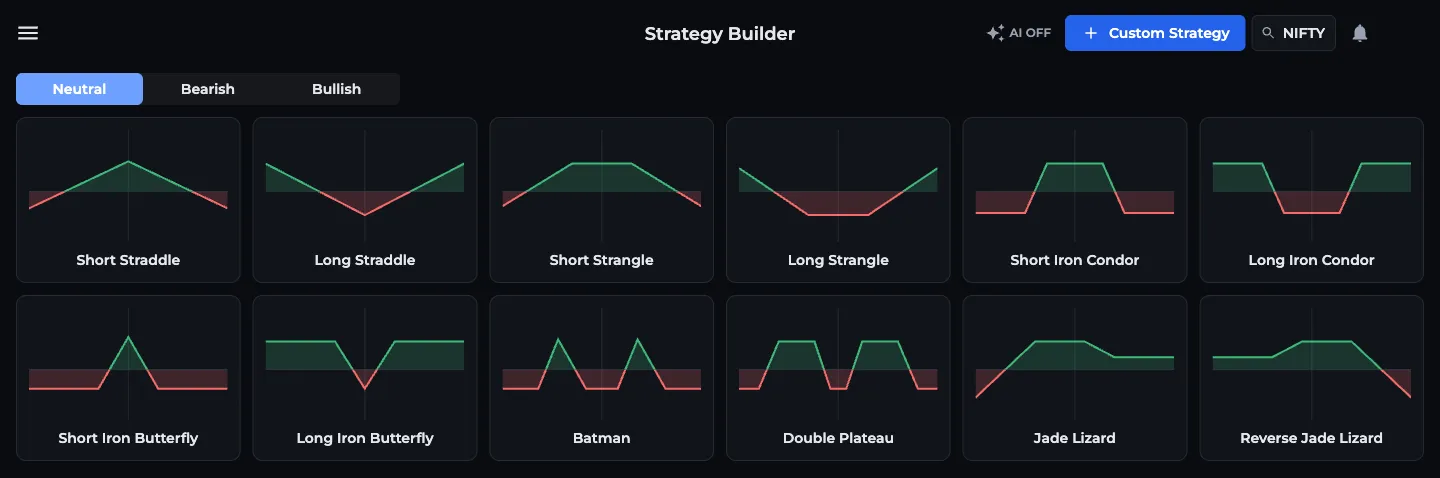
- 1Outlook: Neutral, Bearish, Bullish
- 2Click a template to build its legs
- 3Custom Strategy builds from the chain
- 4Symbol search in the app bar
How do I build a custom strategy from the option chain?
Legs refresh with live prices every 10 seconds, and the browser tab title shows the running P&L. If a leg's contract has expired, you get a warning.
- Press Custom Strategy on the template screen.
- In the option chain section, hover over the volume or LTP cells of a strike on the CE or PE side (on a phone, tap once).
- Press B to buy or S to sell. The leg is added at the current LTP with the multiplier's lots and today's time as entry.
- Repeat for every leg. You can switch symbol with the search and keep the legs you already have.
- Check the metrics strip and the payoff, then press Save.
What does the positions table show?
One row per leg: an include checkbox (untick to leave a leg out of the payoff), the B / S badge (click to flip buy and sell), Lots with plus and minus, Date of entry, Symbol, Option (expiry and strike), Spot with the distance to that leg's breakeven in brackets, Entry (editable, for when your fill differs from the LTP), LTP, P&L and Delta. On phones each leg is a two-line card instead.
Exit position asks for Lots to exit and an Exit price and books the exit. A partial exit splits the leg, so 2 of 3 lots can be closed while 1 stays open. Unexit position reopens it, and the bin deletes the leg. Double-click a row to load that leg's symbol and expiry in the chain.
The bottom row totals Active legs, Lots, Qty, Net Credit or Net Debit, P&L and Delta, with Refresh positions and Clear all legs at the end.
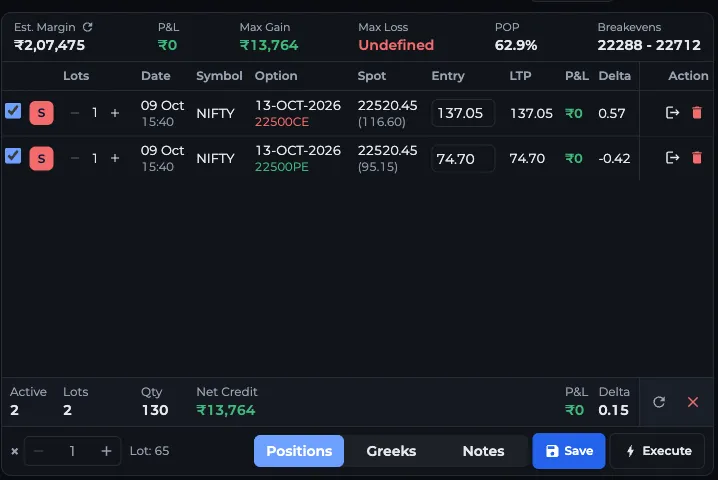
- 1Est. Margin, P&L, Max Gain, POP, Breakevens
- 2B / S badge: click to flip
- 3× multiplier for all legs
- 4Positions, Greeks and Notes tabs
- 5Save or Execute
What do Est. Margin, POP, Max Gain and Breakevens mean?
Payoff and these figures are worked out for the symbol on screen. Legs in another symbol still show in the table and its P&L.
- Est. Margin: fetched from an online SPAN margin calculator for the active legs, with AOC's own SPAN-style estimate when that is unavailable. The small refresh icon fetches it again. Your broker's number can differ.
- P&L: live profit or loss of the active legs at their LTP.
- Max Gain and Max Loss: best and worst outcome at expiry. Undefined means unlimited, like the upside loss on a naked short call.
- POP: probability of profit at expiry, from a lognormal model using the legs' implied volatility. It is a model figure, not a forecast.
- Breakevens: the expiry breakeven, or the lowest and highest breakeven when there are two or more.
How do the payoff chart, multiplier and tabs work?
The Chart / Payoff switch in the app bar flips the chart section between the live candle chart of the symbol and the payoff diagram. The payoff draws the expiry line (green above zero, red below), a dashed T+0 line for today, the spot and each breakeven marked BE. Hover for the expiry and T+0 P&L at any price, drag to pan, use the mouse wheel to zoom and double-click to reset.
The × stepper at the bottom is the multiplier: going from 1 to 2 doubles every leg's lots, and new legs come in at that many lots. Lot shows the lot size. The tabs switch between Positions, Greeks (IV, Delta, Theta, Gamma and Vega per leg, signed for buy or sell and multiplied by lots, with a total row, see option Greeks) and Notes, which shows your stock notes for each symbol in the strategy.
How do Save, Execute, Customize layout and AI mode work?
Save asks for a strategy name and notes and stores it in your portfolio. Once saved, the app bar shows a share icon and View as guest. Saving again updates the same strategy.
Execute places the strategy as real orders through AliceBlue. Your AliceBlue account must be linked and approved in your profile. AOC saves the strategy, checks each contract and the margin against your available funds, and shows every leg for review before Place orders. Orders go as market, NRML, day. Buys are sent first, and sells only go if every buy went through. Check AliceBlue for the fills.
Customize layout shows or hides the three sections (Chart & Payoff, Option Chain, Positions & Greeks), puts each in the left or right column and orders them. By default the chain is on the left, with chart above positions on the right. On wide screens you can also drag the gaps between sections to resize them.
The AI toggle switches the chain to AOC's AI option chain data. AI chains can have fewer strikes, so a wide template like Double Plateau may not fit with AI on.
Frequently asked questions
How accurate is the margin in AOC Strategy Builder?
Est. Margin comes from an online SPAN margin calculator, with AOC's own estimate as a fallback. It is a guide. Your broker's margin can differ with their own rules, hedge benefits and intraday changes.
What does POP mean in the strategy builder?
POP is the probability of profit at expiry. AOC calculates it from a lognormal price model using implied volatility, so treat it as a model estimate, not a prediction.
Can I place orders from AOC Strategy Builder?
Yes, with a linked and approved AliceBlue account. Execute saves the strategy, checks margin, shows each leg for review and then sends market NRML orders, buys first.
How many prebuilt strategies does AOC have?
Thirty: 14 Neutral, 8 Bearish and 8 Bullish. Each one is built on the live chain at current premiums when you click it.
Is Strategy Builder included in AOC Pro?
It needs Strategy Builder access, which comes as an add-on to an active plan or with plans that include it. The same access opens the Strategy Simulator and Strategy Portfolio.
Last updated