Option chain
Getting Started with AOC Calculator: First Steps
AOC Calculator (Advance Option Chain) is an option chain analysis app for NSE, BSE and MCX that puts open interest, OI change, volume, IV, Greeks, PCR and support and resistance on one screen. This page gets you from a new account to a live NIFTY chain in a few minutes, and shows where every tool sits in the menu.
On this page
How do I create an AOC account?
Open Create account and fill in Full name, Email, Mobile number (10 digits) and a Password of at least 6 characters. Got a referral code from a friend or mentor? Tap Have referral code? and paste it in.
After Create account the app takes you to the log in screen. You can also skip the form completely: Continue with Google on the log in page creates the account from your Google profile.
How do I log in?
On the log in page type your email or mobile number in Email or mobile, then your password. Tick Remember me on your own phone or laptop: the app keeps your login id, and after you log out it shows a Continue as button that signs you back in with one tap.
Forgot the password? Tap Forgot password?, enter your email, tap Send OTP, then type the OTP and a new password and tap Save password.
How does the 7-day free trial work?
The trial starts when you verify your mobile number. After you sign up, a Mobile verification box asks for it: tap Send OTP, enter the 6-digit code within 5 minutes and tap Verify OTP.
The first verification adds 7 days of AOC Pro and Live Webinar access to your account. If you already have an active plan, the 7 days are added on top of your current expiry. Each mobile number and each account gets the trial once.
Closed the box by mistake? It comes back in your next browser session, and your profile has a button to open it again.
What is free and what needs AOC Pro?
Free: the Back Tester (log in needed), plus the guides and the Market Mood Index on the home page, which need no login. Symbol pages such as /optionchain/nifty also show visitors a summary delayed by 15 minutes: spot, future, PCR, max pain, resistance and support.
AOC Pro: the live option chain with every pop-up chart, the stock screeners (Power Stocks, AI Stocks, S/R Stocks, Oi2Oi, Triple S/R Stocks), Multi Charts and Market Overview. Plans and prices are on the pricing page. If you open a Pro screen on a free account, the plans show right there and the screen opens as soon as payment goes through.
Where is each tool in the menu?
Tap the menu button at the top left (on a big screen the home page keeps the menu open on the left). Your name and a Pro or Free badge sit at the top; tap the card for Profile, AOC Traders Community and Logout.
- Option Chain: Live Option Chain, Tabbed AOC, Trading Panel, Back Tester
- Charts: Multi Charts, followed by Pricing
- Strategy: Builder, Simulator, Portfolio
- Live Webinar: the evening webinar, marked LIVE
- Stock Screener: Power Stocks, AI Stocks, S/R Stocks, Oi2Oi Stocks, Triple S/R Stocks
- Charts & Graphs: Multi OI Graphs, Multi Percentage Graphs, All OI Bar Graphs, All Volume Bar Graphs, OI Graphs Replay
- Sector Analysis: Sectorial Data, Sectorial Replay; then Market Overview and Stock Notes
- App: Settings, and Install app (Add to home screen on phones)
- Markets: FII / DII Data, Global Markets
- Help & legal: Guides, Contact Us, Support Tickets, Reviews, the policies and Clear Data/Cache
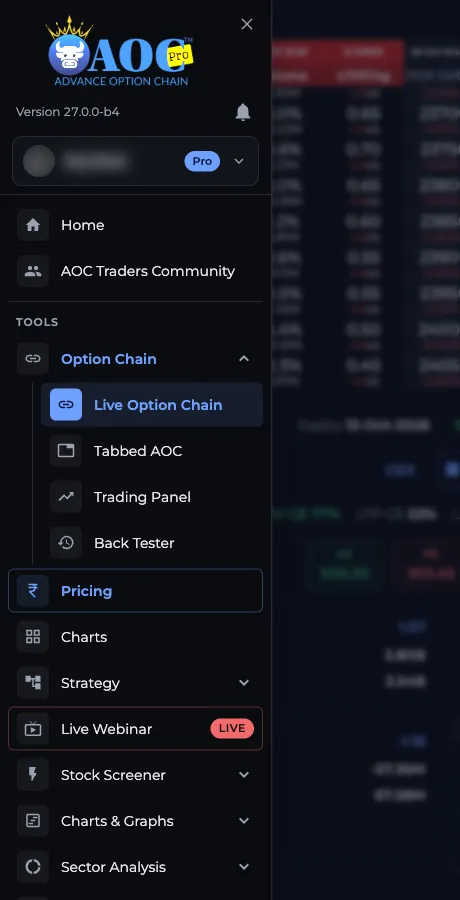
- 1Profile card with Pro or Free badge
- 2Option Chain: Live Option Chain
- 3Strategy: Builder, Simulator, Portfolio
- 4Stock Screener group
- 5Charts & Graphs group
How do I open the NIFTY option chain and switch symbols?
- Log in, then pick Live Option Chain in the menu (or the Live Option Chain tile on the home page). It opens the NIFTY chain at /optionchain/nifty.
- Tap the symbol pill in the top bar (on a phone it is just the magnifier icon). The Search Symbols box opens.
- Type part of the name, for example BANK for BANKNIFTY or CRUDE for crude oil, and tap the row. Enter picks the first match.
- Tap the star on any row to make it a favourite. Favourites are saved on your account and always appear at the top of the list.
- Open the Settings from the button under the chain if you want different columns, a bigger font or the split chart off.
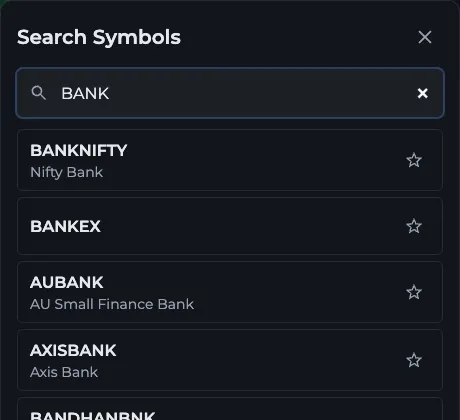
- 1Type part of the symbol name
- 2Tap a row to open its chain
- 3Star marks a favourite
What should I read next?
Start with the live option chain guide: it explains every colour and number on the main screen. Then try the LTP Calculator, which opens when you tap any LTP cell. If the terms are new to you, the glossary pages on open interest and PCR are a quick read.
Frequently asked questions
Is AOC Calculator free to use?
Partly. The Back Tester, the Market Mood Index, the guides and the delayed symbol summaries are free. The live option chain, stock screeners and other live tools need AOC Pro, and every new account can try AOC Pro free for 7 days after verifying its mobile number.
How do I get the AOC Pro free trial?
Sign up, then verify your mobile number with the OTP the app sends. The first verification adds 7 days of AOC Pro and Live Webinar access. A mobile number can start the trial only once, on one account.
Can I log in to AOC with Google?
Yes. Tap Continue with Google on the log in page. If no account exists for that Google email, one is created for you.
Which symbols can I search in AOC?
The Search Symbols box lists indices such as NIFTY, BANKNIFTY, FINNIFTY, MIDCPNIFTY and SENSEX, F&O stocks and MCX commodities. Type part of a name to filter the list, and star the ones you use daily so they stay on top.
Does my AOC account work on the Android and iOS apps too?
Yes. The same login and the same subscription work on the website, the Android app and the iOS app. Settings stay on each device unless you save them to your account from Settings.
Last updated