Strike tools
LTP Calculator: Option Entry, Stop Loss and Target
The LTP Calculator in AOC estimates what an option will be worth if the index reaches a price you type in, and gives you an entry, a stop loss and a target premium for that trade. Option buyers use it to plan a limit order at support before the market gets there; sellers use the Sell side to see where their stop and target sit.
On this page
Where do I find the LTP Calculator?
Tap the LTP/Chg cell of any strike in the option chain. The CE half opens the call calculator, the PE half opens the put. The pop-up title tells you which one you got, for example LTP Calculator · 22500 CE.
It works on the live chain (an AOC Pro feature) and on the replayed chain inside the Back Tester. The option's LTP, delta, gamma and theta are taken at the moment you tap and stay frozen while the pop-up is open, so close and reopen it if the market has moved a lot.
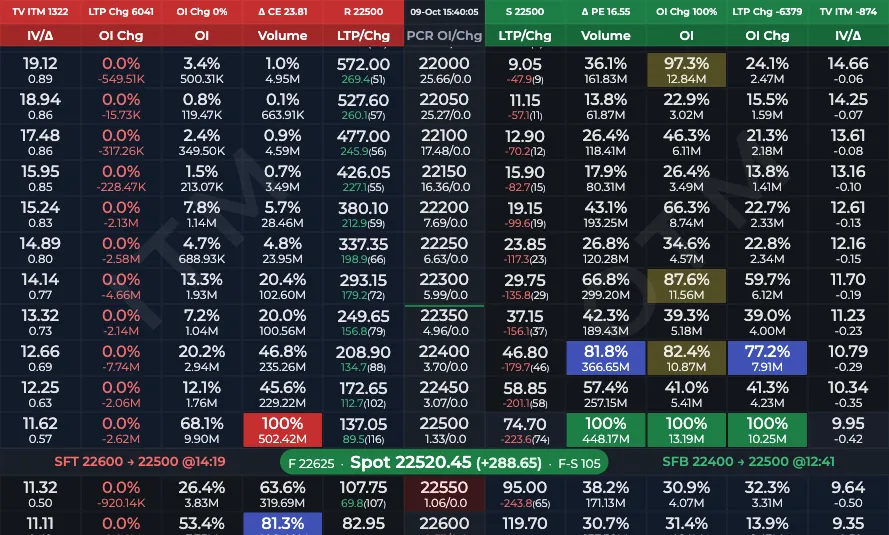
- 1Tap CE LTP/Chg for the call calculator
- 2Tap PE LTP/Chg for the put calculator
How do I calculate an entry price?
- Tap the CE or PE LTP/Chg cell of the strike you want to trade.
- Type the underlying price you expect in the box. It opens pre-filled with the current spot (or future) price, and Paste drops in a number you copied, such as a support level from the strike S/R pop-up.
- Pick Spot or Future as the pricing basis. The default follows Default pricing in Settings.
- Pick Buy or Sell.
- Read the four boxes: LTP, Entry, SL and Target. Tap a number to select it for copying.
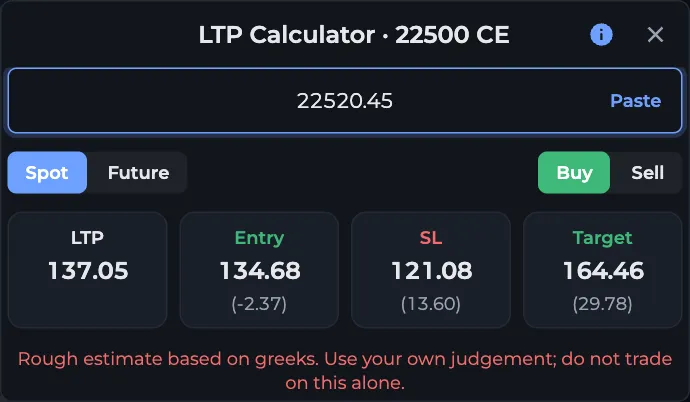
- 1Type the target spot price
- 2Paste a copied level
- 3Spot or Future basis
- 4Buy or Sell
- 5LTP, Entry, SL and Target
How does the calculator work out the prices?
Entry is the option's estimated premium when the underlying reaches your target price. AOC moves the current LTP by delta and gamma for the distance between today's price and your target, then takes a small theta deduction. It is a greeks-based estimate, which is why the pop-up says so in red under the boxes.
Stop loss and target are not fixed percentages. They come from the strike's own width: the gap between its resistance and support reversal levels (50 points if that gap is not available). For a Buy, the stop is the premium at half that width against you, and the target is the premium at the full width in your favour. For a Sell it flips: the stop is half the width against a short, the target the full width.
The small numbers in brackets are the differences: Entry minus LTP, the loss from Entry to SL, and the profit from Entry to Target, all in premium points.
Worked example: buying a NIFTY call at support
Say NIFTY spot is 22,480 and the 22,500 CE trades at 120, with delta 0.50, gamma 0.0008 and theta of minus 14. The strike's support is around 22,440 and resistance 22,540, so the width is 100 points.
You expect a dip to 22,420 and type that in, on Spot, side Buy. The calculator shows Entry near 89.4 (minus 30.6 from LTP), SL near 67.8 (a 21.6 point loss, priced at 22,370) and Target near 138.6 (a 49.2 point profit, priced at 22,520).
Place a limit buy around 89 and you are not chasing the option when the dip comes.
When should I not trust the numbers?
- Big moves. Delta and gamma describe small moves well; a 300 point target on NIFTY can be off by a lot.
- IV changes. The estimate assumes implied volatility stays where it is. An IV crush after an event makes real premiums lower than shown.
- Expiry day. Gamma and theta change by the minute, and the frozen greeks go stale fast.
- Illiquid strikes. If delta is zero or the LTP is stale, the output means nothing.
Frequently asked questions
What does the LTP Calculator in AOC do?
It estimates an option's premium at an underlying price you choose, then gives an entry, stop loss and target for a buy or a sell. It uses the option's delta, gamma and theta and the strike's support to resistance width.
Why are the stop loss and target different for every strike?
They are measured in underlying points from the strike's own resistance minus support width: half the width for the stop, the full width for the target. A strike with a wide S/R gap gets a wider stop and a bigger target.
Should I use Spot or Future pricing?
Use the one you track. If you mark levels on the NIFTY future chart, pick Future so the target you type and the strike width are both on the future basis. The calculator keeps the number you typed when you switch and only recalculates.
Is the LTP Calculator accurate?
It is a rough greeks-based estimate, good for planning limit orders near the current price. It ignores IV changes and gets less reliable for large moves and on expiry day, so use your own judgement.
Last updated