Account and plans
AOC Support Tickets and Contact Options
An AOC support ticket is a written conversation with the support team that you start from the Contact Us page and follow on the Support Tickets page. For quick questions you can also call or WhatsApp 9953 262 262, message on Telegram or email [email protected], every day from 9:00 AM to 9:00 PM IST.
On this page
How do I contact AOC support?
Support hours are every day, 9:00 AM to 9:00 PM IST. The Contact Us page shows whether the team is available right now.
- Call 9953 262 262.
- WhatsApp the same number.
- Telegram: open AOC support from the Contact Us page.
- Email [email protected].
- Support ticket: the form on the Contact Us page. Best for anything that needs screenshots or a paper trail, such as a payment issue.
How do I raise a support ticket?
- Go to Contact Us, or tap New ticket on the Support Tickets page.
- Under What is this about?, pick a topic: Platform support, Billing and payments, AOC Pro and plans, Courses or Something else.
- Fill in your full name, mobile number and email address.
- Write your message (up to 2,000 characters). Be specific: which screen, which symbol, what you expected and what you saw.
- Tap Attach to add up to 5 files of 10 MB each: images, PDFs or text files. You can also paste a screenshot into the message box.
- Tap Create ticket. You see Ticket #number created and get an email with a link to the ticket.
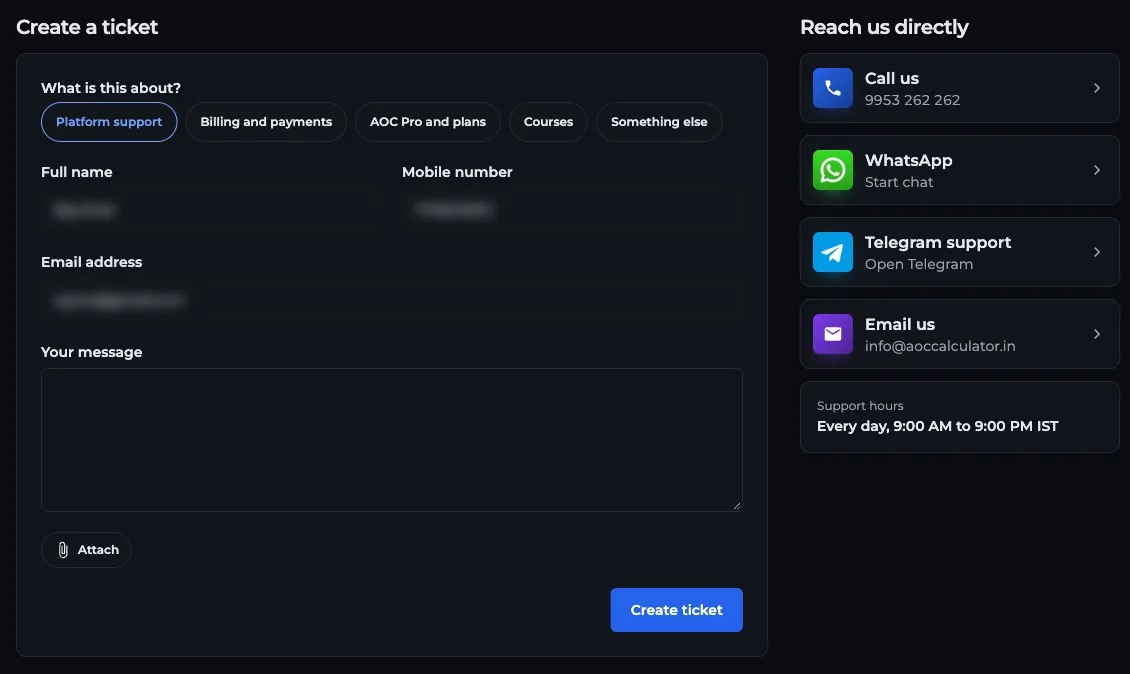
- 1What is this about? Pick a topic
- 2Your message, up to 2,000 characters
- 3Attach up to 5 files
- 4Tap Create ticket to send
- 5Call, WhatsApp, Telegram or email
Where do I see my tickets?
Open /tickets, or Profile and then Support tickets. You need to be logged in. Newest activity comes first, and each row shows the ticket number, subject, status and a preview of the last message.
Filter by All, Open, Awaiting you or Resolved with the switch at the top.
Raised a ticket while logged out? Use the link in your email; it opens the ticket without logging in. Tickets created while logged in show up in your list.
What do the ticket statuses mean?
- Open: the team has your message and it is on their side.
- Awaiting you: support has replied and needs something from you, like a screenshot or an order ID.
- Resolved: the issue is closed. You can still reply; replying sets it back to Open.
How do I reply to a ticket?
Open the ticket to see the full thread, with your messages on the right and AOC Support on the left. Type in the reply box at the bottom (up to 5,000 characters), attach files if needed and tap Send.
The open ticket refreshes every 30 seconds, so a reply from the team shows up without reloading.
What should I include for billing problems?
Choose Billing and payments as the topic and add the order ID. You can copy it from Profile, then Order history, where each order has an ID with a copy icon. Add the amount, date, gateway (Razorpay or PhonePe) and a screenshot of the bank or UPI debit.
If money left your account but the order shows Failed, it usually comes back by itself within 4 to 5 working days. The Plans and Billing guide covers refunds and renewals.
Frequently asked questions
What is the AOC Calculator customer care number?
Call or WhatsApp AOC support on 9953 262 262. Support is available every day from 9:00 AM to 9:00 PM IST. You can also email [email protected] or raise a ticket from the Contact Us page.
How do I check the status of my AOC support ticket?
Log in and open the Support Tickets page at /tickets. Each ticket shows Open, Awaiting you or Resolved. If you raised it without logging in, use the link in the confirmation email.
Can I attach screenshots to an AOC ticket?
Yes. Tap Attach on the ticket form or reply box to add up to 5 files of 10 MB each, as images, PDFs or text files. You can also paste a screenshot straight into the message box.
What are AOC support hours?
Every day, including weekends, from 9:00 AM to 9:00 PM IST. Tickets raised outside these hours are answered when the team is back.
Last updated